Contents
Verse of the Day HTML Code
Build HTML code that you can copy and paste in the HTML for your website. If you're happy with the defaults already in place, you can copy the code below or, if you'd like to customize, you can do so before copying.
Customize (Optional):
Copy and Paste code
Below is the HTML code that you can copy and paste into the HTML for your own web page. Click here to preview the result of the code.
<script
           src="https://www.biblegateway.com/votd/votd.write.callback.js"></script>

<script
           src="https://beta.biblegateway.com/votd/get/?format=json&version=NIV&callback=BG.votdWriteCallback"></script>

<!-- alternative for no javascript -->

<noscript>


<iframe framespacing="0" frameborder="no" src="https://beta.biblegateway.com/votd/get/?format=html&version=NIV">View Verse of the Day</iframe>

</noscript>
Verse of the Day Web Service
Verse of the Day is available as a free Web service from Bible Gateway. To use this service, please refer to our tutorial.
Bible Gateway App
The award-winning and critically-acclaimed Bible Gateway App is free to download (https://www.biblegateway.com/app). The images below are of the Bible Gateway App in use on a variety of devices.


Scanning the QR codes below with your mobile device takes you immediately to either the iTunes Store or Google Play where you can download the Bible Gateway App to your device. QR codes work best in print but can also work on screen. Copy-and-paste these codes into your blog, church bulletin, newsletters, etc.

http://tinyurl.com/pnmv3x2
Scan this QR Code with your mobile device to download the free Bible Gateway App for iOS (iPad, iPhone, etc.).

http://tinyurl.com/q25quvz
Scan this QR Code with your mobile device to download the free Bible Gateway App for Android.
Bible Gateway Ref Tag Tool
Bible Gateway Reference Tagging Tool
What is it?
Using the code provided, transform all plain-text Scripture references on a webpage into hyperlinks to the appropriate Bible passage from BibleGateway.com. When you hover the mouse pointer over the hyperlinked text, the text of the Bible passage appears in a pop-over window, allowing the visitor to view the passage without leaving the current web page. Inside the pop-over window are links to view the passage on BibleGateway.com as well.
- Jeremiah 29:11
- Rom 8:28
- Prov 3:5-6
- 1 Corinthians 13:1-13
Save yourself the trouble of manually entering book, chapter, and verse references every time you want to cite Scripture!
How it works
Simply copy and paste the Javascript code from the box below into your site. We recommend pasting it at the end of each page on which you want the reference tagging to function, just before the </body> tag.
Options
- BGLinks.apocrypha (default false). Set to true to find references to books in the Apocrypha.
- BGLinks.clickTooltip (default false). Set to true to show the tooltip when clicking the link rather than when hovering over it.
- BGLinks.showTooltips (default true). Set to false to add links to Bible Gateway without any tooltip functionality.
Choose your translation
Choose the translation you want to appear:
Bible Gateway Widgets
By simply copying and pasting some HTML code into your HTML page you can have the form below on your website(s).
Form example:
The HTML source code:
Copy the following code and paste it into the HTML for your web page.
<form action="https://www.biblegateway.com/quicksearch/">

<table border="1" cellspacing="0" cellpadding="2" style="border-color: #600;">

<tr><th style="background-color: #600; color:#fff; text-align: center; padding: 0 10px;">Lookup a word or passage in the Bible</th></tr>

<tr><td style="background-color: #fff; text-align: center; padding: 0 10px;">

<div  style="margin-bottom: 0;">

<input style="margin:2px" type="text" name="quicksearch" /><br />

<input style="margin:2px" type="submit" value="Search BibleGateway.com" /><br />

</div>

<a href="https://www.biblegateway.com/" title="The Bible in multiple languages, versions, and formats">

<img src="https://www.biblegateway.com/assets/images/logos/bglogo_sm.gif?103106" width="146" height="44" alt="BibleGateway.com" border="0" /></a><br />

<small>

<a href="https://www.biblegateway.com/usage/form/">Include this form on your page</a><br />

</small>

</td></tr>

</table>

</form>
Third Party Widgets
This section is to place links to widgets that have been created outside of Bible Gateway. Links do not imply endorsement.WordPress Plugin: Bible Gateway VOTD
WordPress Plugin: Bible Gateway Links Shortcode
WordPress Plugin: Bible Verse Display
WordPress Plugin: Bible Gateway Reference Linking
Mac Dashboard Widget: Bible Gateway Search
Mac Dashboard Widget: Bible Gateway Search
Instructions to Link to Bible Gateway Verses
Linking Bible verses to BibleGateway.com: If you use WordPress as your blog platform, you may want to use the independently developed WordPress plugins “Scripturizer” (http://wordpress.org/plugins/scripturizer/) or “BibleGateway Links Shortcode” (http://wordpress.org/plugins/biblegateway-links-shortcode/) to link the Bible verses you use on your blog to their locations on BibleGateway.com, as per the BG² agreement.
Available for you to use on your blog is the Bible Gateway Bible Reference Tagging Tool (see above). This is a way for you to link back to Bible Gateway’s verses. Or manually link the references/verses you include in your posts. Here are the instructions:
- When you write within a blogpost a Bible reference (e.g., John 3:16) or a passage (e.g., John 3: 1-16) or a grouping (e.g., John 3: 1, 15-17, 19), open a new browser tab or window and go to https://BibleGateway.com.
- On the top of our homepage, select your preferred Bible translation from the dropdown version box.
- Go back to your blogpost and copy the reference or passage or grouping as the examples above show.
- Go back to BibleGateway.com and paste what you’ve copied into the search box to the left of the version box.
- Click the Search button.
- The resulting page will display the verses for the Bible reference you pasted. Go up to the top URL browser bar; highlight and copy the URL.
- Go back to your blogpost. Highlight the text you want to link. Click your blog’s editing function that inserts links into your blogpost and paste the BibleGateway.com Bible reference search result URL into it.
Twitter & Facebook Streams and Sample Tweets & Posts
Use the following code to embed the Bible Gateway Twitter stream on your website (by default the widget will fit the width of its parent element in the page you're embedding it. For example, if you paste your embed code in a div that's 300px wide, the timeline itself will be 300px wide):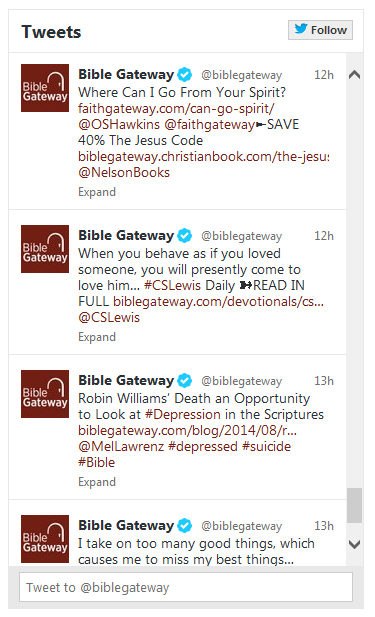
Use the code below to embed the Bible Gateway Facebook feed on your website:

You can adjust the following attributes in the above code:
* width - the width of the plugin in pixels.
* height - the height of the plugin in pixels.
* show_faces - specifies whether to display profile photos in the plugin
- #Pastor / #church: In your bulletin & PowerPoint tell your people to use https://BibleGateway.com & follow @BibleGateway. Thank you! #pastors
- https://BibleGateway.com is the original multi-language online Bible & the world's most visited Christian website.
- https://BibleGateway.com is where desktop, laptop, tablet, & mobile users read, search, study, compare, & share the Bible.
Add Bible Gateway to Your Google Toolbar
If you use Internet Explorer as your Web browser, you may want to download the Google Toolbar (Google Toolbar Help Center) and add button links to your favorite websites to more quickly visit them.
To add Bible Gateway, go to https://www.biblegateway.com/ and right click in the top Search box. On the menu that appears, click "Generate Custom Search...".

The Google Toolbar Custom Button Generator will appear; click "Add".

The Bible Gateway button is now added to your Google Toolbar; click it every time you'd like to quickly use Bible Gateway to search, read, study, compare, and share the Bible online.